Roamzo eSIM: Travel Data for Fitcations and Wellness Retreats
What Roamzo's travel eSIM offers, how to choose a plan for a fitcation or retreat, how setup works and the limits to check before you fly.


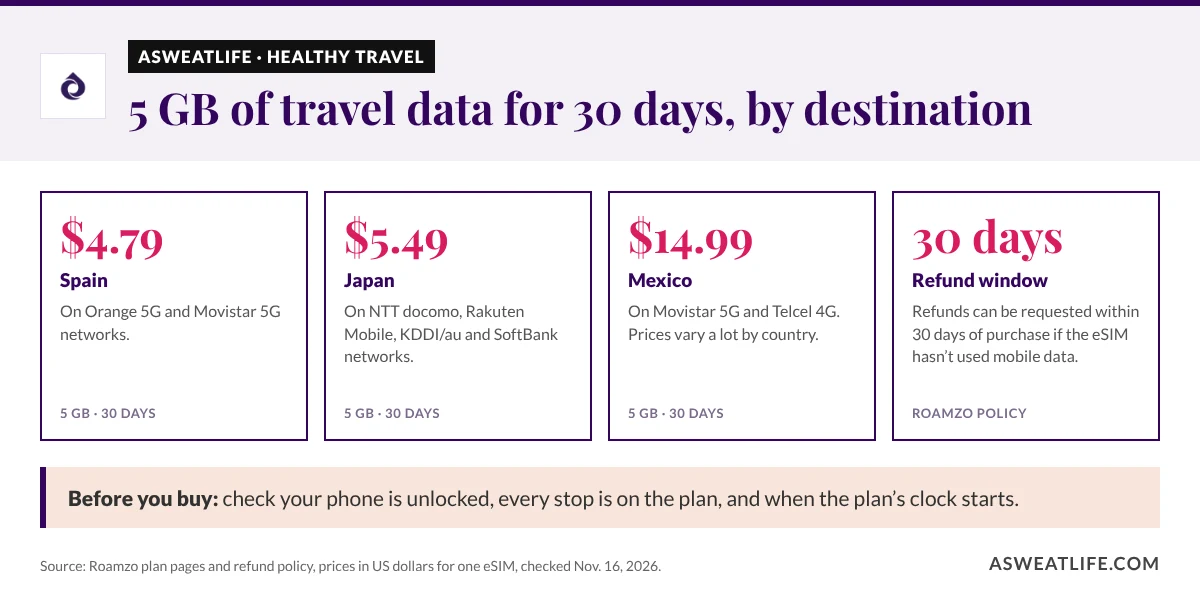
If you’re planning an active trip abroad, a Roamzo eSIM is one way to get prepaid mobile data for finding the studio, opening a class booking or messaging your retreat host from the airport. Its 5 GB plans valid for 30 days started at US$4.79 for Spain and US$5.49 for Japan when checked on Nov. 16, 2026.
Below, we cover what Roamzo offers, how it fits a fitcation or wellness retreat, how to choose and compare plans, how setup works, and the limits to know about, from fair use to smartwatches.
What Does a Roamzo eSIM Offer?
Roamzo sells prepaid travel data you install on a compatible, unlocked phone, without swapping out your usual SIM. This look at Roamzo is based on its published plans, setup guidance and terms. Here’s what stands out:
| Feature | What travelers should know |
|---|---|
| Plan choices | Single-country, regional and global plans, each with its own list of included destinations |
| Data | Fixed bundles, plus unlimited plans where offered, which come with fair-use limits |
| Setup | An Install eSIM option in your order, plus QR-code and manual methods |
| Phone requirements | An unlocked, eSIM-compatible phone; the exact model and regional version matter |
| Calls and texts | Travel data plans don’t include a local number, standard calls or texts |
| Hotspot | Supported, so a laptop or tablet can share your phone’s data |
| Account tools | Installation details, usage information and top-ups on eligible plans |

How Does an eSIM Help on a Fitcation or Retreat?
A drop-in class abroad often depends on your phone: finding the entrance, checking the schedule and pulling up your booking. If you’re planning your first fitcation, sort out mobile data alongside your bookings and packing list.
Retreats are similar. Hosts often send pickup points or arrival details while you’re between the airport and your accommodation, so think about what you’ll need to open on the way. aSweatLife’s guide to deciding whether a wellness retreat is right for you can help with the bigger decision.
Keep expectations realistic. Roamzo provides the connection, but whether a particular booking or messaging app works abroad depends on that app and your account with it.
How Do You Choose a Roamzo Plan?
Start with your whole itinerary. A single-country plan suits a trip based in one place. For several countries, compare separate plans with a regional or global one, checking every stop against its destination list, because a name like “global” doesn’t mean every country is included.
Then pick an allowance and validity. A 5 GB bundle gives you 5 GB for the whole plan, so look at how much mobile data your phone used in a recent typical week and adjust for extra navigation, photo uploads, video calls or time away from Wi-Fi.
Prices vary a lot by destination. Here’s the same 5 GB, 30-day plan in three places:
Single-destination plans for one eSIM, checked Nov. 16, 2026; these aren’t a bundle covering all three countries. Browse the full destination catalog for other destinations, and confirm the final price at checkout.
Compare any quote with your carrier’s travel pass and other eSIMs using the same destinations, data, validity and number of phones.
How Does Roamzo Setup Work?
- Check your exact phone. It needs to support eSIM and be carrier-unlocked, and regional versions of the same model differ. Use Roamzo’s device checker and your phone maker’s guidance.
- Read the plan’s start rule. Installing and activating are separate, but some plans start on their first network connection and others when installed.
- Install over Wi-Fi. After you pay, open the instructions in your order and use the Install eSIM option, QR code or manual details.
- Switch to the travel line. When you arrive, set the Roamzo line for mobile data and follow the plan’s roaming steps. Keep data roaming and automatic data switching off on your home line.
- Keep the instructions handy. Save your order details and know how to reach support. If it won’t connect, contact support before deleting the eSIM.
On compatible dual-SIM phones you can keep your usual SIM for calls and texts while Roamzo handles data. Apple’s international eSIM guide explains the iPhone settings, and Roamzo’s setup guide covers its own process.
Use the checker below to see what’s left to do before you fly.
Check off what’s already done for your fitcation or retreat. The checker shows what’s left to do before you fly.
Still to do
What Are the Limits of a Travel eSIM?
Unlimited plans can slow down. Roamzo’s fair-use policy says speeds may be reduced after a plan’s high-speed allowance is used, though data access continues for the plan’s validity. If you plan to stream workouts or take regular video calls, check the high-speed allowance first. Roamzo Ultra, where offered, raises that allowance but not the network’s top speed.
Hotspot shares the same data. A laptop or tablet can use your phone’s connection, but on a fixed plan it eats into the same bundle. Pause large updates and cloud backups to make it last.
Coverage depends on local networks. Check which operators your plan uses and the signal near where you’re staying. More data can’t fix a dead zone, and a 5G listing doesn’t mean 5G everywhere.
Top-ups and renewals vary by plan. Only eligible plans can be topped up, and automatic top-ups or renewals need separate consent and a saved card.
How Can You Stay Connected and Still Switch Off?
Set up your phone for what you actually need on the trip. Download entertainment on Wi-Fi, save booking confirmations, and keep arrival details on your phone instead of buried in an unopened email.
Check what your map app can do offline. Google Maps downloads don’t give walking, cycling or transit directions offline, while Apple Maps supports offline directions in supported areas, including walking and cycling. Download and test your map before you rely on it.
If you want real screen-free time, set your notifications and agree on a meeting plan with your group. Our guide to unplugging while on vacation has ideas for setting those boundaries.
Roamzo eSIM FAQ
Can I keep my number and WhatsApp?
Yes, on a compatible dual-SIM phone. Your home line stays active while Roamzo handles data, and WhatsApp keeps your registered number. Your carrier may still charge for calls, texts or roaming on your home line.
Can I use a Roamzo eSIM as a hotspot?
Yes. Roamzo supports hotspot and tethering, so a laptop or tablet can use your phone’s connection. Those devices share the plan’s data and fair-use limits.
Does the travel eSIM include a phone number?
No. Roamzo’s travel data plans don’t include a local number, standard calls or texts. Internet calling and messaging apps work over the data.
Will the same plan connect my smartwatch?
Not on its own. A travel eSIM on your phone doesn’t give your watch a cellular connection. Apple Watch cellular needs an eligible plan with a supported carrier, so check your watch separately if you want to leave your phone behind.
Can I get a refund if the plan doesn’t suit my trip?
Roamzo’s refund policy allows requests within 30 days of purchase if the eSIM hasn’t used mobile data on a supported network, and Roamzo checks activation and usage with its supplier first.
Do I need an eSIM if my plan already includes roaming?
Not necessarily. Compare your plan’s included countries, data and any daily charges with your itinerary. If you need a local number for regular calls, factor that in too.
Roamzo is worth a look if you want prepaid data, digital setup and a choice of single-country or multi-country plans. Match the plan to where you’re going and what you’ll use, keep key arrival details saved offline, and spend more of the trip on what brought you there.