7 AI Tools That Turn Text Into Fitness Videos
Filming workout content takes time: booking a space, setting up a camera and editing clips can eat a whole week. AI tools that turn text into fitness videos can cut that down, and several have free tiers. If you post the results, know the rules: YouTube requires creators to disclose realistic altered or synthetic content when they upload.
Below, we compare seven tools by what they make, what they cost and where they fall short, then cover how to choose one and the safety checks every AI workout clip needs.
Which AI Video Tools Turn Text Into Fitness Videos?
The seven tools here fall into four groups. Generators (Magic Hour, Google Flow, Runway and Kling AI) create original footage from a prompt or a photo. Avatar tools (HeyGen) put a digital presenter on screen to read your script. Script-to-video editors (InVideo) help you plan and edit a full promo, and repurposing tools (Pictory) turn articles and scripts into captioned videos.
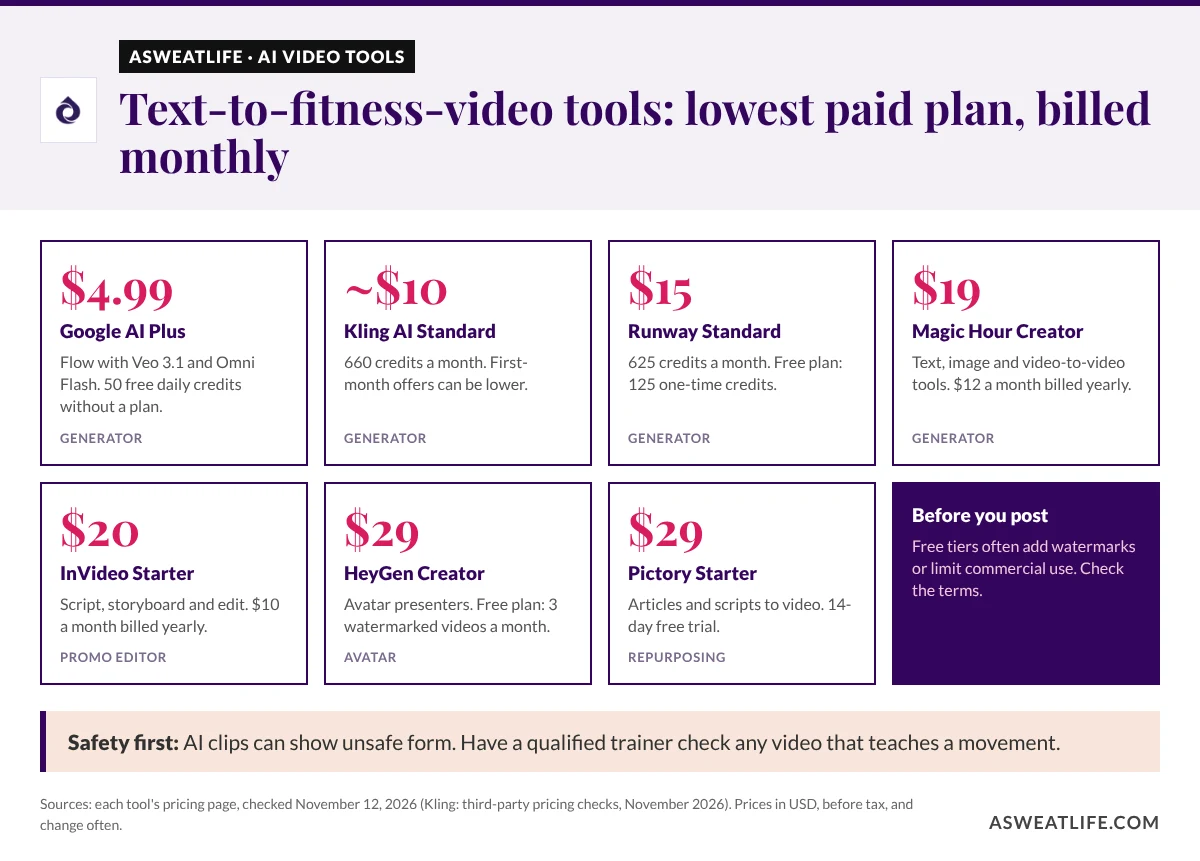
Prices below are the lowest paid plan on monthly billing, checked on each tool’s pricing page on November 12, 2026. Yearly billing is cheaper on most of them, and prices change often.
| Tool | Type | Lowest paid plan (monthly) | Free option | Good fit for |
|---|---|---|---|---|
| Magic Hour | Generator | $19 (Creator) | Free account with signup credits | Short teasers from text or photos |
| Google Flow (Veo 3.1) | Generator | $4.99 (Google AI Plus) | 50 free credits a day | Realistic scenes with sound |
| Runway | Generator | $15 (Standard) | 125 one-time credits | Polished brand clips |
| Kling AI | Generator | About $10 (Standard) | Free Basic tier, personal use only | Low-cost testing |
| HeyGen | Avatar presenter | $29 (Creator) | 3 watermarked videos a month | Coaching explainers |
| InVideo | Script-to-video editor | $20 (Starter) | No free plan listed | Class and studio promos |
| Pictory | Repurposing | $29 (Starter) | 14-day free trial | Turning articles into video |

1. Magic Hour: Text, Photo and Video Tools in One App
This article covers content creation tools and isn’t exercise or medical advice. Have a qualified trainer check any video that teaches a movement.
Magic Hour’s video generator makes short clips from a text prompt, an image or existing footage, and its AI video editor lets you change a clip by describing the edit. A separate image to video tool takes one photo, such as a still of your studio or a class, uses it as the starting frame and animates it into an MP4.
Pricing: on monthly billing, Magic Hour’s plans cost $19 for Creator, $39 for Pro and $99 for Business, dropping to $12, $25 and $66 a month on yearly billing. A free account comes with 400 signup credits. Free exports are 480p clips of 3 seconds, may carry a watermark and are for personal, non-commercial use only.
Watch for: clip length and resolution depend on the model you choose. LTX-2.5, for example, runs up to 60 seconds on an eligible plan, and 4K is only available on some paid models.
Good fit for: trainers and small studios making social teasers and class promos from a written idea or a single photo.
2. Google Flow With Veo 3.1: Realistic Scenes With Built-In Audio
Google Flow is Google’s AI filmmaking app. It runs Veo 3.1, which Google says delivers native audio and excels at physics and realism, alongside its newer Gemini Omni Flash model for generating and editing video. Detailed prompts that describe the light, setting and camera angle tend to give the best results.
Pricing: without a subscription you get 50 free Flow credits a day. Paid Google AI plans add monthly credits: Plus costs $4.99 a month, Pro $19.99 and Ultra from $99.99.
Watch for: clips are short, so a longer video means generating several scenes and stitching them together, and retries use credits too.
Good fit for: gym brands and creators who need b-roll, ad hooks and mood shots.
3. Runway: Polished Clips for Brand Campaigns
Runway is a generative video suite. Its paid plans include access to all of its AI video and image models, including Gen-4.5, which costs 60 credits per 5 seconds of video.
Pricing: the free plan includes a one-time deposit of 125 credits that doesn’t expire. Standard costs $15 a month, Pro $35 and Max $95, or $12, $28 and $76 a month billed yearly.
Watch for: at Gen-4.5 rates, Standard’s 625 monthly credits cover a little over 50 seconds of footage, so budget for retries.
Good fit for: agencies and premium fitness brands that want campaign-quality visuals.
4. Kling AI: A Low-Cost Way to Test Ideas
Kling AI generates clips from text and images. Its pricing shifts with promotions: independent checks of its pricing page in November 2026 listed Standard at about $10 a month for 660 credits, and new subscribers are often offered a lower first month.
Watch for: content made on the free Basic tier isn’t licensed for commercial use, and the size of the free credit allowance varies by account, so check what yours shows before you plan around it.
Good fit for: solo creators who want to experiment cheaply before committing to a bigger plan.
5. HeyGen: An Avatar Coach for Workout Explainers
HeyGen creates presenter videos from a script in a text-based editor. It adds auto captions and can generate multilingual avatar videos from one script, with voices in more than 175 languages and dialects.
Pricing: the free plan allows 3 watermarked videos a month, each up to 1 minute. Creator costs $29 a month with 1080p export, Pro $49 and Business $149, and yearly billing brings Creator down to $24 a month.
Watch for: an avatar talks the viewer through an exercise but doesn’t perform it, so pair it with real footage of the movement.
Good fit for: coaches and gyms making onboarding videos, class explainers and member updates without filming themselves.
6. InVideo: Script, Storyboard and Edit a Promo
InVideo helps you write a script with an AI co-writer, turn it into a shot-by-shot storyboard, and then edit the timeline by describing the change you want in plain words.
Pricing: plans are charged per seat. Starter costs $20 a month or $10 a month billed yearly, with 400 credits per seat, and the pricing page doesn’t list a free plan.
Good fit for: studios and gyms that put out regular promos for classes, challenges and events.
7. Pictory: Turn Workout Articles Into Video
Pictory turns text, scripts, articles and blog posts into videos, giving each line a scene, a visual, a voice and captions. You can also edit the video by editing its transcript.
Pricing: there’s a 14-day free trial. Starter costs $29 a month, Professional $59 and Teams $199 on monthly billing. Starter supports seven languages, and Professional and Teams support 29.
Good fit for: nutrition coaches, bloggers and newsletter writers who want to reuse content they’ve already written.
Here’s how the lowest paid plans compare at a glance.
How Do You Choose an AI Fitness Video Tool?
Start with the job the video has to do, then compare how each plan counts usage.
| If you need… | Look at | Why |
|---|---|---|
| A spoken explainer or member update | HeyGen | An avatar reads your script on screen |
| A teaser, ad hook or b-roll | Magic Hour, Google Flow, Runway or Kling AI | Generators create original scenes from text or a photo |
| A video from an existing article | Pictory | It splits your text into captioned scenes |
| A full class or studio promo | InVideo | Script, storyboard and editing in one place |
- Test on a free plan or trial first. Make the exact kind of clip you need before you pay.
- Check commercial rights. Magic Hour and Kling AI both limit free content to personal use, so upgrade before posting for a business or a client.
- Count your clips. Most plans use monthly credits, and failed or rejected generations can still use them up.
- Plan the editing. Even a strong clip needs trimming, captions and your own branding.
If you’re building a filming corner for the real demos, these tips on setting up a home gym from fitness pros help you plan the space.
Not sure which kind of tool you need? Run through the quick match below.
Answer four questions about the video you want to make. You’ll get the type of tool that fits, the options from this guide to try first, and a checklist before you post.
1. What are you making?
2. Will you appear on camera?
3. Monthly budget
4. Is it for a business or client?
Try first
Before you post
Is AI-Generated Workout Video Safe to Post?
AI video can get the human body wrong. Limbs may bend at odd angles, reps can look impossible, and the form on screen may be unsafe to copy. Never use a generated clip as the only demonstration of a movement.
- Film real demos for technique. Use AI for teasers, motivation and explainers around them.
- Get a professional review. Have a certified trainer check any clip that teaches a movement. Our guide to choosing a dietitian, health coach or trainer explains who does what.
- Show options. If a teaser features a demanding format, point viewers to an easier version, such as a low-impact HIIT workout for your level.
- Label it. Turn on YouTube’s altered or synthetic content setting for realistic AI footage. YouTube may add a label itself if you don’t.
AI Fitness Video FAQ
Can AI create realistic workout demonstration videos?
Sometimes, but not reliably. Generated bodies can move in ways people can’t, so film real demonstrations for technique and use AI for supporting visuals.
Which tool suits trainers who don’t want to be on camera?
HeyGen is the closest fit, because an avatar presents your script. Pair it with real footage when the video shows an exercise.
Are free plans good enough for a fitness channel?
They’re good for testing ideas. Expect watermarks, low resolution or limited credits, and check commercial rights: Magic Hour and Kling AI restrict free content to personal use.
How long can AI-generated clips be?
It depends on the tool and model. Most generators make clips of a few seconds, Magic Hour’s free clips are 3 seconds, and its LTX-2.5 model reaches 60 seconds on an eligible plan. Longer videos are usually stitched together from several clips.
Do I have to label AI fitness videos?
On YouTube, yes, if the content looks realistic. Labeling AI-generated clips also helps viewers know which demonstrations are real.