Paying Monthly for a Workout App? An Annual Plan Can Save You Up to 67% a Year
Eleven home workout apps ranked by price, class types and who each suits, including three free picks and Apple Fitness+ at $79.99 a year.

If you want to work out at home this winter, the best fitness apps for home workouts split into two camps: free libraries you can start tonight, and paid memberships that add live-style classes, programs or coaching. Apple Fitness+ is the strongest value among the paid options at $79.99 a year, while Nike Training Club, ALO Wellness Club and FitOn give you full workout libraries for $0.
This guide ranks 11 home workout apps by what each one offers: price, class types, equipment needs and who it suits. Every price below comes from the app maker’s own page or its US App Store listing, checked in November 2026, and the cost table near the end shows how much an annual plan saves over paying month to month.
Our picks at a glance:
- Best value overall: Apple Fitness+, $79.99 a year for 12 workout types plus meditation, shareable with five family members.
- Best free app: Nike Training Club, $0 with no in-app purchases.
- Best free yoga and Pilates: ALO Wellness Club, $0 for more than 4,000 classes.
- Best for instructor-led classes: Peloton App One, $159 a year through the App Store.
- Best for strength with your own gear: Fitbod, from $79.99 a year, with over 1,000 exercises.
- Best for women’s life-stage programs: Sweat, $134.99 a year, with pregnancy, postpartum and menopause programs.
| App | Price (US) | Class types | Best for |
|---|---|---|---|
| Apple Fitness+ | $9.99/month or $79.99/year | 12 types plus meditation | Apple Watch and iPhone owners |
| Peloton App | App One $15.99/month or $159/year; App+ $28.99/month or $289/year (App Store) | Strength, yoga, cycling, running, rowing, meditation | Instructor-led classes, with or without a bike |
| Nike Training Club | Free | Strength, HIIT, yoga, Pilates, mobility | Free structured programs |
| ALO Wellness Club | Free | Yoga, Pilates, barre, HIIT, meditation | Yoga and Pilates fans on a $0 budget |
| Les Mills+ | Base $14.99/month or $89.99/year; Premium $29.99/month or $179.99/year | Strength, cardio, mind/body, BODYPUMP | Choreographed group fitness formats |
| obé | $24.99/month or $169.99/year | 20+ types, including sculpt, Pilates, HIIT | Variety in a small space |
| Sweat | $24.99/month or $134.99/year | Strength, HIIT, barre, Pilates, yoga, running | Women’s programs for every life stage |
| Centr | $29.99/month or $119.99/year | Strength, HIIT, Pilates, yoga, HYROX, boxing | Coached strength and hybrid training |
| Fitbod | $12.99 to $15.99/month or $79.99 to $95.99/year | Strength training plans | Progressive lifting with home equipment |
| FitOn | Free; optional PRO $19.99 to $39.99 | Cardio, strength, HIIT, yoga, Pilates, dance, barre | Free classes with well-known trainers |
| Down Dog | $12.99 or $99.99 for All Access (App Store) | Yoga, Pilates, HIIT, barre, meditation | Customizable practices that change every session |
How We Chose These Home Workout Apps
We ranked apps for one job: helping you move consistently at home with little or no equipment. Each app had to offer workouts you can do in a living room, run on a phone, and publish its pricing on its own site or in the US App Store. Prices, class types, trial lengths and library sizes come from those pages, checked in November 2026. No app on this list was tested by our team, and none paid for placement.
The order reflects value for a home exerciser: how much variety and structure you get per dollar, whether you need extra hardware, and how well the app serves a specific goal. A good benchmark for any app is whether it helps you hit the CDC’s weekly targets of 150 minutes of moderate activity and at least 2 days of muscle-strengthening work. Apps that blend cardio and strength make both easier to reach from home.
1. Apple Fitness+: Best Value for iPhone and Apple Watch Owners
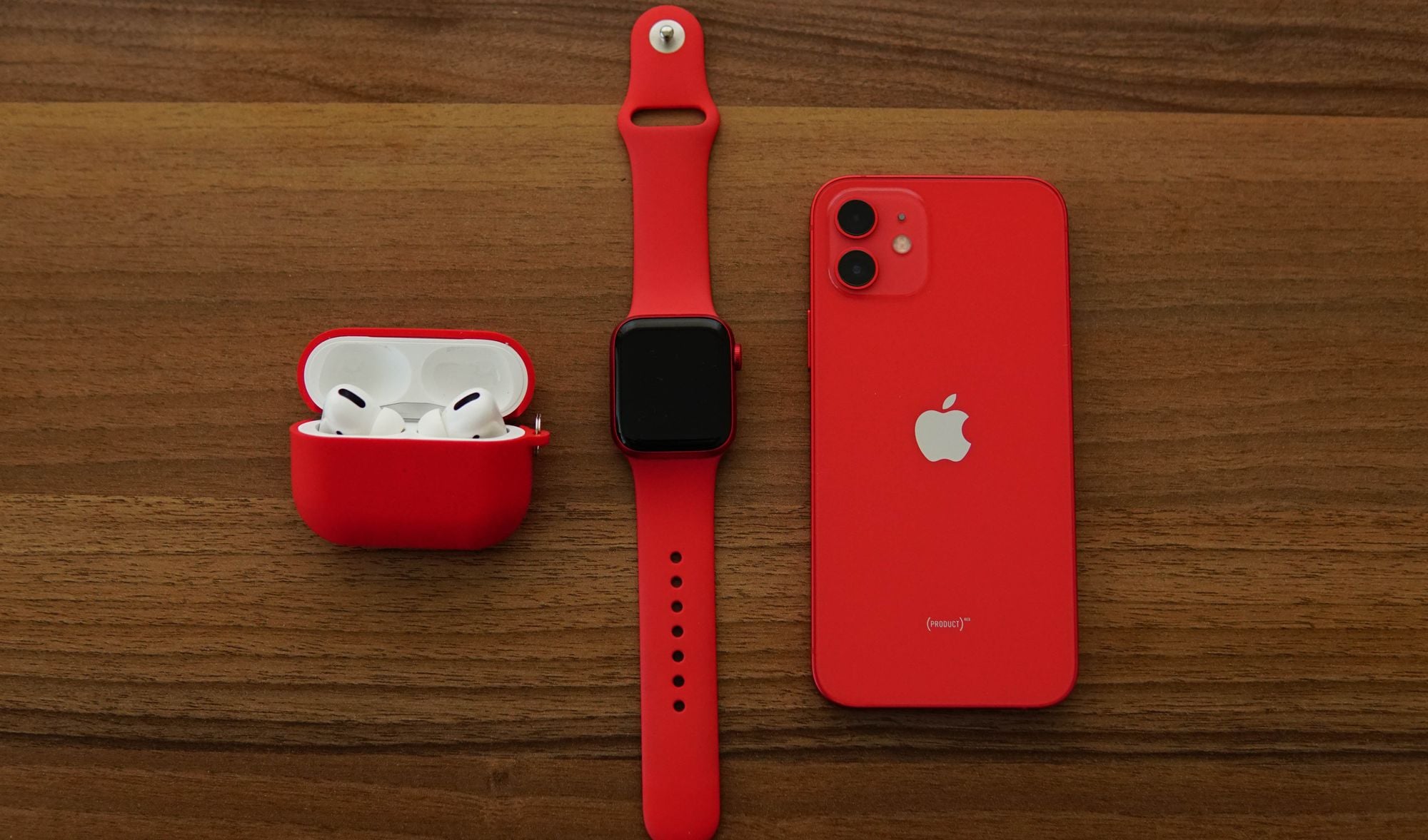
Apple Fitness+ is Apple’s on-demand workout service, and its yearly plan ties Fitbod’s lowest yearly price as the cheapest paid membership on this list. Apple Fitness+ costs $9.99 per month or $79.99 a year in the US, new subscribers get one month free, and buyers of an eligible new Apple device get 3 months free.
The library covers 12 workout types plus meditation, including cycling, HIIT, kickboxing, yoga, rowing, Pilates, strength, treadmill run, dance, core and mindful cooldown. Most of those need nothing more than a mat, and the cycling, rowing and treadmill classes work on any machine you already own. Up to five family members can share one subscription through Family Sharing, each with their own personalized experience, which makes the per-person cost hard to beat for a household.
The catch is hardware. You need an iPhone 8 or later on iOS 16.1 or later. An Apple Watch is not required, but it adds live metrics on screen. Android households should look further down the list.
2. Peloton App: Best for Instructor-Led Classes Without the Bike
You don’t need a Peloton bike to use the Peloton App. The Peloton App offers two paid tiers and a 30-day free trial for new members. App One includes unlimited strength, yoga, meditation, outdoor running and gym workouts, plus 3 cardio equipment classes a month on any bike, treadmill or rower. App+ adds unlimited cardio classes for any machine and access to Peloton Strength+.
In the US App Store, App One is $15.99 a month or $159 a year, and App+ is $28.99 a month or $289 a year. Peloton’s class list spans strength, Pilates, cycling, running, yoga, rowing, meditation, stretching, walking, outdoor and cardio, so one membership covers most of a training week.
App One suits anyone who loves high-energy instructors and mostly works out on the floor. App+ only earns its higher price if you own a bike, treadmill or rower and want more than 3 equipment classes a month. A credit card is required to start the trial.
3. Nike Training Club: Best Free App With Structured Programs
Nike Training Club is free, and the US App Store listing shows no in-app purchases, so there is no paywall waiting after a trial. The Nike Training Club app offers progressive workout programs with nutrition, recovery and mindset tips, new content daily and a casting feature for watching on a TV.
Workout categories include total-body strength, conditioning with HIIT and sprint intervals, core, yoga and Pilates, recovery, mindfulness and equipment-free bodyweight training. Home workouts are built for small spaces and travel, and weeks-long programs give you a plan to follow when you would rather not choose a workout every day.
The trade-off for $0 is fewer formats than the paid apps: no cycling or rowing classes and no live-style sessions. For a first home routine, that matters less than having a plan, and NTC gives you one.
4. ALO Wellness Club: Best Free Yoga and Pilates Library
ALO Wellness Club is the app formerly called Alo Moves, and it is now free. The ALO Wellness Club app lists more than 4,000 classes and 300 programs and describes itself as “Always Free. No subscriptions, no credit card, no catch.”
Yoga is the core of the library, with Vinyasa, Ashtanga, Hatha, Restorative, Yin, Kundalini, Prenatal and yoga for beginners. Fitness classes cover Pilates, strength, sculpt, cardio, HIIT, barre, dance and core, and the mindfulness section adds guided meditation, breathwork, yoga nidra and sound healing.
The App Store listing still shows optional one-off program purchases, such as EveryBody Yoga with Jessamyn Stanley and Barre Sculpt with Jacquelyn Umof at $39.99 each. You can ignore those and still have thousands of classes. If a calmer practice is part of your goal, pair it with one of the meditation apps that help you be more mindful.
5. Les Mills+: Best for Choreographed Group Fitness Formats
Les Mills+ streams Les Mills programs, including BODYPUMP and indoor cycling, for home workouts. The Les Mills+ app offers a Base and a Premium tier with a 14-day free trial for new customers.
Base costs $14.99 a month or $89.99 a year and gives you a lighter collection on web and mobile only. Premium costs $29.99 a month or $179.99 a year and adds 2,000+ workouts, every Les Mills program, workout plans, challenges, downloads and TV streaming. The library spans strength, cardio and mind/body sessions, including hundreds of bodyweight-only workouts.
Les Mills+ suits anyone who already loves a Les Mills class at the gym and wants the same music-driven choreography at home. BODYPUMP-style sessions work best with a barbell or adjustable weights, so check our home fitness equipment for every budget before you commit to Premium.
6. obé: Best Class Variety for Small Spaces
obé is a streaming studio built around short, energetic classes. The obé app advertises 10,000+ on-demand classes across 20+ class types, including sculpt, strength, yoga, Pilates, HIIT and meditation, and a subscription covers all live and on-demand video content.
In the US App Store, obé lists $24.99 a month, $64.99 a quarter or $169.99 a year, with lower $19.99 monthly and $135.99 annual options also shown. New members get 7 days free to try it.
obé works well when variety keeps you showing up: a sculpt class one day, Pilates the next, yoga on the weekend. If mat and reformer-style Pilates are your thing, our guide to choosing the right reformer fitness class explains how the formats differ.
7. Sweat: Best for Women’s Programs at Every Life Stage
Sweat is a program-based app for women, with trainers including Kayla Itsines, Kelsey Wells and Britany Williams. The Sweat site lists 70+ programs, including 52 strength programs, 32 low-impact programs, 11 no-equipment programs, and dedicated programs for pregnancy, post-pregnancy and perimenopause and menopause.
In the US App Store, a Sweat Monthly Subscription is $24.99, quarterly is $54.99 and yearly is $134.99. Signing up through the website includes a 7-day free trial; payment details are required, and the trial converts to a paid plan unless you cancel before it ends.
Workout styles include HIIT, circuit training, bodyweight, powerbuilding, strength, yoga, barre, Pilates, recovery and cardio, at beginner, intermediate and advanced levels. You can pick workouts with no equipment, free weights or machines, so the same membership works at home and at the gym. Low-impact options are also why low-impact workouts are trending with home exercisers.
8. Centr: Best for Coached Strength and HYROX Training
Centr is the training app developed by actor Chris Hemsworth, and its workouts cover strength, HIIT, Pilates, yoga, HYROX, boxing, MMA and hybrid training. Sessions run from 5 to 60 minutes, and you can choose coached or self-guided workouts and filter by equipment and body part.
The US App Store lists Centr at $29.99 a month or $119.99 a year, with a 7-day free trial. The membership includes meal plans that adapt to food preferences, with plant-based and high-protein options, plus meditations. Centr’s training programs include HYROX-certified plans with station-specific workouts, a good fit if you are working toward a first HYROX race.
Centr also sells home gym equipment, but the app works without it. Its yearly plan costs less than the yearly plans for Peloton, obé or Sweat, though its $29.99 monthly rate ties Les Mills+ Premium as the highest monthly price here.
9. Fitbod: Best for Building Strength With the Equipment You Own
Fitbod is a strength-training planner. You tell it what equipment you have, such as none at all, a set of dumbbells or a full rack, and it builds each session for your fitness level and gear. Its adaptive AI learns from your edits to its recommendations and balances exercises over time, drawing on a library of over 1,000 exercises with video walkthroughs.
The US App Store shows monthly plans at $12.99 and $15.99 and yearly Fitbod Elite plans at $79.99 and $95.99, with a 7-day free trial. Fitbod connects with Apple Health, Strava, Fitbit and Apple Watch.
There are no instructor-led classes here, so Fitbod suits anyone who wants a plan and a log more than a coach on screen. Strength training ranked among the most popular workouts in our look at why walking and strength training took off, and Fitbod is built around that goal.
10. FitOn: Best Free Classes With Well-Known Trainers
FitOn keeps every workout free. FitOn PRO adds premium features on top of the free workouts: premium music stations, personalized meal plans, 500+ recipes, unlimited offline downloads and real-time heart rate from Fitbit, Garmin or Samsung devices.
The free library covers cardio, strength, HIIT, yoga, Pilates, dance, barre and guided meditation, and you can browse by category, body part, length and intensity. Trainers include Cassey Ho of Blogilates and Jeanette Jenkins, plus classes with Gabrielle Union and Julianne Hough.
FitOn PRO in-app prices in the US App Store range from $19.99 to $39.99 depending on the plan. You don’t need PRO to work out (it only adds extras around the classes).
11. Down Dog: Best for Customizable Yoga, Pilates and HIIT
Down Dog builds a new practice each time you open it, based on the length, level and focus you choose. The Down Dog family of apps covers Yoga, Pilates, HIIT, Barre, Prenatal Yoga and Meditation, and one subscription opens the full library in the app.
The US App Store lists an All Access Subscription at $12.99 and $99.99, alongside Pro Membership options at the same prices. The yoga app holds a 4.9 rating from 327K ratings in the US App Store.
Down Dog suits anyone who gets bored of repeating the same recorded class. It does not offer live-style classes or big-name instructors, but it does offer a fresh sequence every session.
What Each Fitness App Costs Over a Year
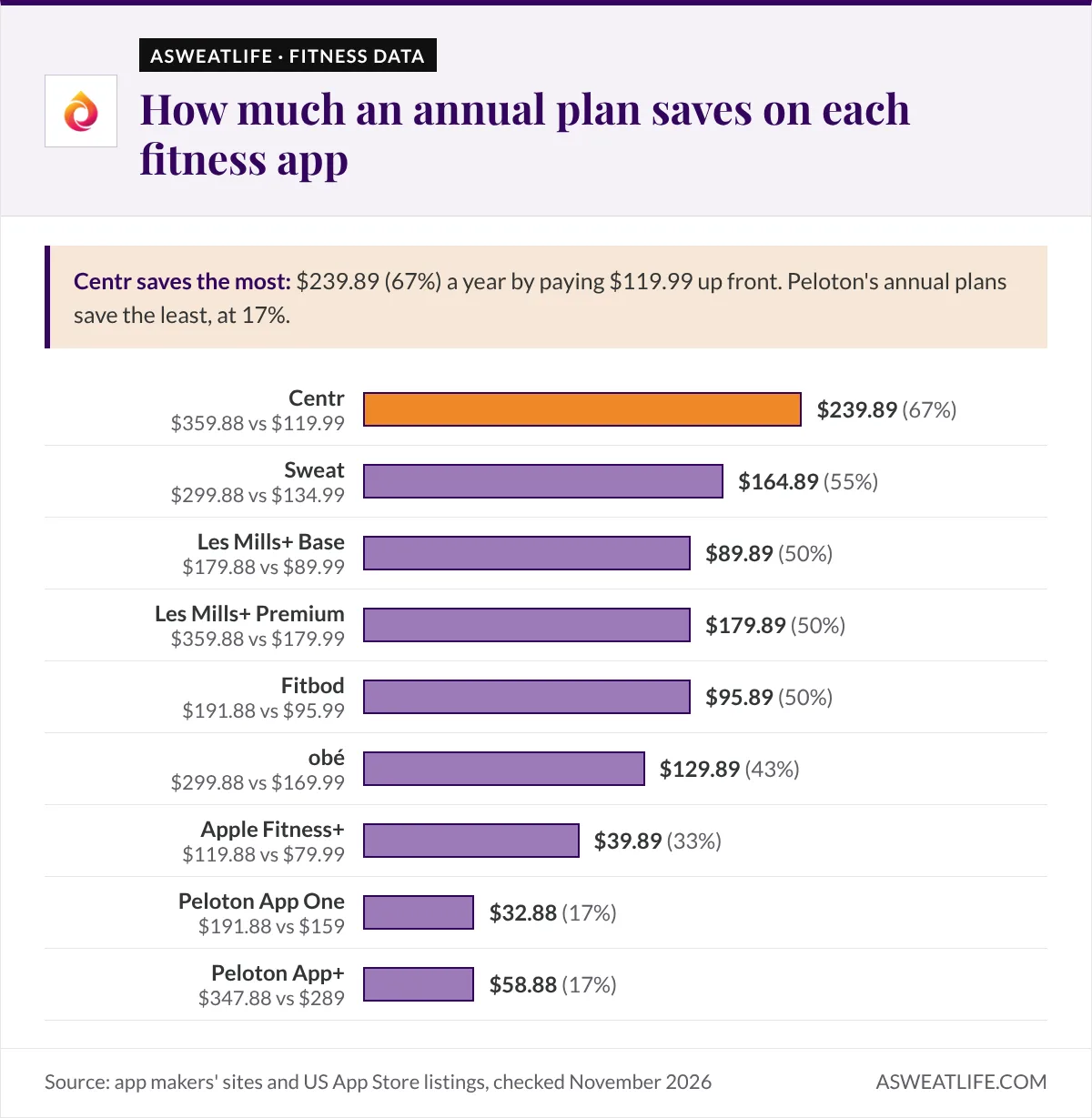
Annual plans cut the cost of every paid app on this list, and the gap is bigger than most monthly prices suggest. The table compares 12 months of monthly billing with each app’s yearly plan, using the prices above. The saving is our own calculation from those listed prices, before tax.
| App and plan | 12 months at the monthly price | Annual plan | You save |
|---|---|---|---|
| Apple Fitness+ | $119.88 | $79.99 | $39.89 (33%) |
| Peloton App One (App Store) | $191.88 | $159 | $32.88 (17%) |
| Peloton App+ (App Store) | $347.88 | $289 | $58.88 (17%) |
| Les Mills+ Base | $179.88 | $89.99 | $89.89 (50%) |
| Les Mills+ Premium | $359.88 | $179.99 | $179.89 (50%) |
| obé | $299.88 | $169.99 | $129.89 (43%) |
| Sweat | $299.88 | $134.99 | $164.89 (55%) |
| Centr | $359.88 | $119.99 | $239.89 (67%) |
| Fitbod | $191.88 | $95.99 | $95.89 (50%) |
Centr shows the biggest gap: its $119.99 yearly plan costs about a third of paying $29.99 a month for a year. Peloton’s annual plans save the least, at 17%. The smart order is to use the free trial, decide whether the app fits your week, then switch to annual before the first full month bills.
Which Fitness App for Home Workouts Should You Choose?
Start with your budget and the workout you will actually repeat. If $0 is the number, Nike Training Club gives you structured programs, ALO Wellness Club gives you the deepest free yoga and Pilates library, and FitOn gives you the widest mix of free class formats.
Filter the 11 apps by yearly budget and class type to see which plans fit.
If you will pay, match the app to your goal. Apple Fitness+ is the best value for an iPhone household. Peloton and obé suit anyone motivated by energetic instructors. Sweat and Centr suit anyone who wants a program to follow for weeks at a time, and Fitbod suits lifters who want their plan to progress automatically. Les Mills+ is the pick if you already love BODYPUMP at the gym.
Whichever you choose, give the free trial a full week of real workouts before you pay. If home workouts have felt like a chore before, our editor’s story on learning to stop hating home workouts has ideas for making them stick.
Fitness Apps for Home Workouts: FAQ
Do I Need Equipment to Use a Home Workout App?
No. Nike Training Club, Sweat, Fitbod and Les Mills+ all offer equipment-free or bodyweight workouts, and most yoga and Pilates classes need only a mat. Dumbbells or resistance bands widen your options, especially for strength apps such as Fitbod.
Can I Use Apple Fitness+ on Android?
No. Apple Fitness+ requires an iPhone 8 or later running iOS 16.1 or later, so Android users should choose Peloton, Nike Training Club, FitOn, Sweat or another cross-platform app.
Can I Cancel a Fitness App During the Free Trial?
Yes. Peloton, Sweat, Les Mills+ and Centr all let you cancel before the trial ends without being charged, but most auto-renew, so cancel at least 24 hours before the renewal date to avoid the next payment.
Can a Family Share One Fitness App Subscription?
Apple Fitness+ can be shared with up to five family members through Family Sharing at no extra cost. Most other apps on this list are sold as individual memberships.
This article is for educational purposes and does not replace advice from a doctor, registered dietitian or qualified trainer.